A lot of people on my Facebook complain about how they hate Facebook, but they’re still there. *shrugs*
I assume people who hate their Facebook accounts aren’t using them correctly.
A few days ago, one of my newer Facebook friends said I have great Facebook friends. I do.

I enjoy the hell outta my Facebook, and I think you can, too.
*whispers* Lemme tell ya how I do it.
1. Give yourself a few hours. Yes, devote a few hours to working on it. Rome wasn’t built in a day, y’all. The more friends you have, the longer it will take.
2. Check your Privacy Settings. If you are confused about your privacy settings, ask a geek, a nerd, or small child to do it with you.
3. Go through your feed. Any games you don’t play? Click the arrow at the upper right hand side of the box and select “Hide.” Then select, “Hide all from (that game).” It may take days or weeks to thoroughly hide all the games you don’t play.
4. Cull. When you have thousands of Facebook friends, you will miss things you wanted to see. Culling can be difficult, because sometimes, you know you’ll see someone you’ve culled, or you have friends in common with that person, which occasionally means you’re morally obligated to stay “friends.” If you really don’t feel like someone is your friend, and you are not morally obligated to friend them, then unfriend them. We’ll deal with obligation later.

5. Hide all the obligatory friends whose posts you hate. Like, if you totally never care what Bessie BadNews does, and quite frankly you couldn’t care less if Bessie BadNews finally fell into her half empty glass of tears, then hide Bessie BadNews by choosing any of her posts, clicking the arrow in the top right hand of the box, and select “Hide.” Then select, “Hide all from Bessie BadNews.” This also works for Braggadocious Brad, Coupon Cathy, Dramatic Dolly, Political Paul, and Snopesless Sal.

6. Restrict. You know how Betty is your mother’s best friend, and she sent you that beautiful Spode platter when you got married, and you don’t wish dear Betty any harm, but sometimes when you post memes with bad words in them, she gets upset, and tells your mother that she wishes you’d wash your own mouth out with soap? Restrict her.
You know how you love your cousin Scott, and the two of you have always been like two peas in a pod, but you can’t stand Scott’s wife? You can’t unfriend your cousin’s wife without having some bad blood, but you can restrict her.
There’s always that one friend who never posts anything ever, and we’re pretty sure he’s not entitled to see your posts, because it’s show and tell, and IT’S HIS TURN. Restrict him.
People who are Restricted cannot see your post unless that post is Public.
Many people from your past are just plain nosy. They want to see how your life is going and then they never speak to you again. Restrict them. Get into the habit of restricting them as soon as you friend them. Some of them have added you to see to whom you might be connected. No one can see who my Friends are, and if you ask me, that’s the best way to be.

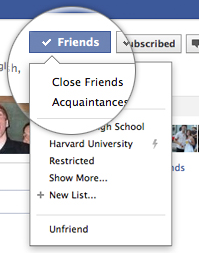
7. Make lists. To make a list, you go to your Friends list, and hover over the box next to their picture. It reads, “Friends,” but that’s where the magic happens. You will place each friend into the appropriate list.
Let’s face it, in real life, if your Facebook friends were visiting your home, you would keep some of them on the porch. Sure, there are some you’d take to bed, or at least hug, but a lot of these people are specifically porch friends.

You can make as many lists as you want. You can call the lists whatever you like. The people on the lists will never know the names of the lists they’re on.

You’ve probably got some people who make your Facebook a better place. You love getting together with these people. They post a lot of things you like. You find you miss these people when you don’t see posts from them. These people can be placed in Facebook’s Close Friends option.
Personally, I have a baker’s dozen I trust implicitly. I tell them anything and everything and they’re always understanding and supportive. If I have a problem, I can call these people at any time, day or night. Virtually nothing offends these people, and they never make drama. I would/do invite these people into my home. I share deeply personal things with them. I can disagree with them or even argue with them, and they will still love me. They are my actual friends. “My people.” You need to know who your people are, in case you want to vent about your family, your bowel movements, your struggles with addiction, your never-ending battle with that one long red hair that grows just a little too high on your forehead to be an eyebrow…
The rest of your friends should be left as Friends.
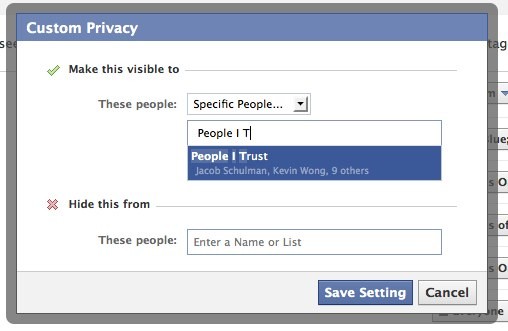
8. Use the lists. Every time you post, the option to choose your audience is available at the bottom right hand of the post. Before you post, make sure the audience is the one you want. Custom Settings are your friend. They’ll allow you to share specific posts with specific people. Your Cat Lovers, Your Bird People, Your Blogger Friends, Your Golf Buddies, Your Antique Hunters.

If you’re posting about a free yoga class, you might want that to be Public.
If you’re posting about a yoga book you enjoyed reading, you might want all your Friends to see that.
If you’re posting about how while you did yoga, your child counted 18 stretch marks on your thigh, maybe you only disclose that to Close Friends and your mom.
If you’re posting a photo of the stretch marks, you should probably reduce that post to people you’d show your thighs to, like your Super Good Friends and your mom.
If you’re in despair posting about stretch marks while you type drunkenly into your phone from the bar of six martinis after visiting the plastic surgeon’s office, maybe you limit that to your Very Best Friends and your therapist.
Yes, this works. I promise you it works. 99% of my posts, including photos, are shown to Super Good Friends and my parents. And by parents, I mean my biological parents, because children of divorce must carefully tread through social media like they carefully tread through holidays, weddings, and funerals.
If using the audience settings did not work, all three of my parents would be angry about whether I prefer my father’s fried potatoes over my dad’s macaroni and cheese or how my mother’s always trying to make sweets into nutritious food or whatever. Don’t even get me started.
9. Recognize the audience of the posts you like and comment on.

If you, Miss Goody-Goody-I-only-post-daily-scripture-and-positive-affirmation-memes click Like on a Public meme about sucking dick, WE WILL ALL SEE THAT YOU’VE LIKED IT. The meme will appear in our feed, and it will actually read, “Miss Goody-Goody likes Dick Sucking’s photo.”
If you write a poignant comment about your abuse as a child at the hands of a drunken father on a Public article, all of your Friends will be informed that you have commented on said article, including your drunken father.
If you try to Share a photo that is not Public, you will see a caution blip about the Privacy Settings. You can still share it, but only the people on the original post can see it.
People try to do this all the time with photos. If I post a photo of my daughter, my Friends can see it. If a Friend Shares it, then only our mutual Friends can see it, meaning the Friends I’ve allowed to see it. I’ve explained this to my parents ninety-gathousand times, and I really don’t think they understand. I guess right-clicking is very hard for people over 60.
But think about that…Should you Share a photo of someone else’s child without permission? Should you?
10. Realize that although the Privacy Settings work, there are sometimes glitches, screenshots are a thing, and people can still share your business the old-fashioned way. So if ultimately, you would just DIE if something was seen by the whole world, then it’s best you not post it.

If none of this works, you should complain about Facebook while using Facebook, or head over to Twitter. Twitter hates Facebook.


































 joeyfullystated
You must be logged in to post a comment.